
A missed punch list item can get expensive. A missing outlet cover or damaged fixture can mean the difference between wrapping up a job on time and dealing with rework, a delayed closeout, or a client dispute.
A construction punch list app helps teams keep outstanding items organized in one place, complete with photos, assignments, and status updates, rather than relying on scattered paper checklists or spreadsheets.
Not every construction project needs the same level of software. Some teams need dedicated punch list tools with blueprint markups, subcontractor assignments, and formal closeout workflows. Others may only need a straightforward way to document outstanding items and manage materials.
Sortly isn’t a dedicated punch list app. It’s a visual inventory management platform that helps construction teams organize and track the materials, tools, equipment, and supplies they rely on across jobsites. For straightforward projects, teams can also use Sortly’s photos and customizable fields to document outstanding items while keeping track of the materials needed to finish the work.
This guide compares eight software options, from simple photo-based tracking to full construction management platforms, to help you find the right fit. Whether you’re managing a short list of outstanding items or coordinating a formal project closeout, we’ll help you understand which features matter most.
What is a construction punch list app?
Depending on the software, teams can document issues with photos, assign tasks, track completion statuses, and generate closeout reports.
A spreadsheet is only as current as its last update. Digital punch lists allow teams to make changes right from the job site, so project managers can see what still needs to be done without having to chase anyone. The additional visibility helps reduce confusion and shorten closeout timelines.
Key features to look for
When comparing punch list apps, consider the features your team needs to document outstanding work and keep projects moving. Usability is just as important: Look for tools your crew can easily adopt and use consistently on the jobsite.
- Mobile and offline access: Add and update items from a phone or tablet, even in areas with limited connectivity. Sync offline changes once connection is restored.
- Photo documentation: Capture photos of unfinished work or defects so team members can clearly see what needs attention. Photos of completed repairs can also help document progress.
- Status tracking: See which issues are outstanding, in progress, or complete.
- QR code and barcode scanning: Quickly identify tagged items or equipment without manually searching for their records.
- Task assignments and deadlines: Assign team members responsibilities and set due dates.
- Job-based tracking: Keep materials and parts associated with individual projects organized in one place.
- Pick lists from inventory: Create lists of all materials and supplies needed to finish the job.
Dedicated punch list tools may also include features like blueprint pinning and photo markups, trade task assignment, verification steps, and formal closeout reports. Whether you need these additional features will depend on the complexity of your project.

Do you need a simple punch list app or dedicated construction management software?
Before comparing specific tools, consider the complexity of your projects and the workflows your team needs to manage. A short list of finishing tasks on a residential remodel may only require straightforward documentation, while a larger project involving multiple trades and formal approvals will likely require a dedicated punch list software.
Choosing a tool that matches your needs can help you avoid paying for unnecessary features or missing capabilities essential to project closeout.
When inventory tracking software is a good fit
For smaller projects with straightforward documentation needs, visual inventory management software may provide enough flexibility to record outstanding items with photos and track the materials needed to complete them.
This can be especially useful for contractors who already use construction inventory management software to organize tools, equipment, and supplies across multiple projects. It may be a good fit when:
- The remaining work involves specific parts or materials, such as installing missing electrical outlets or adding hardware to cabinets.
- You need photo-based documentation and want a visual record of what’s been done and what’s been completed.
- You’re managing a relatively short list of outstanding items on a per-project basis.
- You don’t need blueprint markups, subcontractor assignments, or formal closeout workflows..
For example, a contractor might use inventory software to organize replacement parts for final repairs while documenting outstanding items with photos. A facilities tech could use a similar approach to keep track of standard maintenance.
When you need dedicated punch list software
Dedicated software generally makes more sense when your project requires more structured coordination and approval processes. For example:
- You’re coordinating multi-trade construction projects with formal closeout workflows.
- You require blueprint pinning and drawing markups.
- You need to assign tasks to subcontractors and track responsibility.
- Your projects require formal inspections, compliance documentation, or closeout approvals.
- You’re managing large commercial or residential work run by general contractors.
Even when your team uses dedicated punch list software, inventory management tools can help you track the materials, equipment, and supplies needed to complete outstanding work.
The 8 best punch list management options compared
Construction punch list apps vary in features and complexity, from straightforward photo-based tracking to tools designed for large-scale project coordination. The best fit depends on the size of your projects, the workflows you need to manage, and how your team works on-site.
Below, we compare eight options, including dedicated punch list tools, construction platforms, and more flexible software that can support simple tracking needs.
Sortly
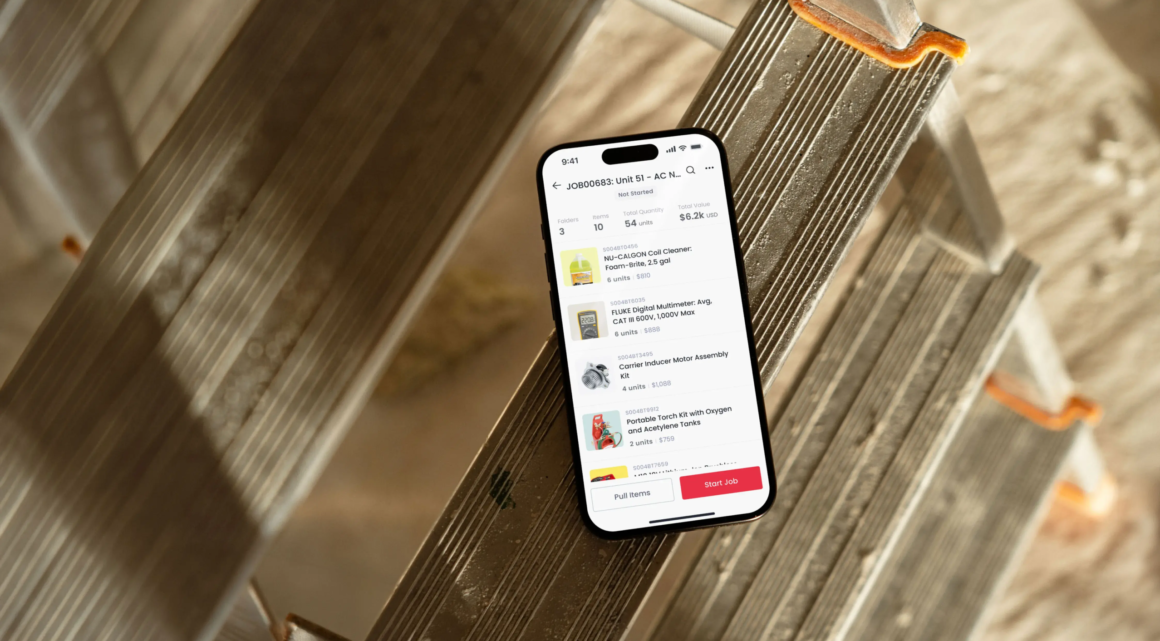
Sortly is a visual inventory management platform that helps construction teams organize and track materials, tools, equipment, and supplies across job sites and projects.
While Sortly isn’t dedicated punch list software, teams can use its customizable item records, photos, and notes to document straightforward outstanding work. It’s best for teams that want that tracking alongside inventory management.
Strengths:
- Mobile access: View and update inventory from a phone or tablet, with offline functionality for working in areas with limited connectivity.
- Photo documentation on every item: Add photos, notes, and item details to help team members identify items and document their condition.
- QR code and barcode scanning: Quickly identify inventory items and access their records from a mobile device, making it easier to keep information up to date in the field.
- Easy, visual organization: Organize items by project, location, status, or other categories that fit your business.
- Job-based inventory tracking: Manage all the parts and materials needed to finish a job.
Platforms: iOS, Android, web
Fieldwire by Hilti
Fieldwire is best for field teams on large commercial projects, combining plan-based task management with closeout workflows.
- Pin items to a digital plan, with photos and photo markups.
- Assign each item to a trade with a due date, and notify the subcontractor.
- Use two-step verification when you need a second person such as the superintendent or architect to confirm the work before an item closes.
- Work offline and sync updates once the connection is restored.
- Get filtered closeout reports, including recurring reports.
Platforms: iOS, Android, web
Bluebeam Revu
Bluebeam Revu is best for document-heavy projects that rely on PDF markup. It’s desktop-first and strongest in plan review, where teams mark drawings and track issues rather than a dedicated punch list workflow.
- Use PDF and drawing markup with document management.
- Collaborate through Studio Sessions (certain plans only).
- Access measurement and plan comparison tools.
Platforms: Windows desktop, with web and iOS capabilities through Bluebeam Cloud. Some features are available only on desktop.
Procore
Procore is best for enterprise construction companies that want integrated punch lists inside a full project management suite.
- Assign responsibility, deadlines, and status to each item.
- Place items directly on a drawing.
- Quick Capture with QR codes, voice input, and short videos, including offline access.
- Get reminders for overdue items, templates, and report generation.
- Connect with other construction and business tools through integrations.
Platforms: iOS, Android, web
PunchPad
PunchPad is designed for straightforward, standalone punch list tracking. It’s aimed at custom home builders, general contractors, and remodelers who need to manage outstanding work during residential project closeout.
- Add items during a walkthrough with photos, assigned trades, and deadlines.
- Filter by location, trade, status, or deadline.
- Share a live report that subcontractors can view without logging in.
- Get unlimited projects and items.
Platforms: iPhone, iPad, Mac, and Apple Vision
Buildup
Buildup is best for the closeout process and turnover workflows, with a focus on issue tracking and inspections.
- Photo capture, notes, and status tracking for each item
- Inspection management, including failed inspection tracking
- Contractor management and collaboration tools
- Customizable reports and a Procore integration
Platforms: Web and mobile
GoAudits
GoAudits is designed for inspection-driven workflows, with a focus on audits and checklists rather than dedicated construction punch lists. It supports site inspections and quality-control processes across multiple industries, including construction.
- Use custom checklists and industry templates.
- Do offline inspections with photos, annotations, and e-signatures.
- Track assigned corrective actions on a central dashboard.
- Create branded PDF reports
Platforms: iPhone, iPad, and desktop
Alpha TransForm
Alpha TransForm is best for custom, no-code forms on Android and iOS. It offers a pre-built punch list template that teams can adapt to their own process.
- Projects, action items, and notes in a three-level structure
- Photo attachments, audio notes, and digital signatures
- Geolocation and automatic date and time stamps
- Offline operation
Platforms: iOS, Android

Tips for effectively using a punch list app
The right app can make punch list management easier, but how your team uses it matters just as much. These five practices can help you stay organized and keep outstanding work moving.
- Use specific descriptions and locations, ideally the ones your team already uses, to manage construction materials on the same job, so nobody has to translate between systems.
- Make ownership clear. Assign someone to each outstanding task so your team knows who is responsible for completing the work.
- Document issues and progress with photos. Capture clear images of outstanding work and completed repairs to maintain a visual record of what’s been addressed.
- Set deadlines. Establish target completion dates for outstanding tasks so your team knows when each item needs attention.
- Keep your punch list up to date. Review outstanding items regularly and update their status as work progresses. Recording completed tasks promptly helps everyone understand what’s left to do.
Before scheduling the remaining work, check that the necessary replacement parts and materials are available. Knowing what you have on hand—and what still needs to be ordered or brought to the jobsite—can help your team avoid unnecessary trips and keep the final stages of a project on track.
Choose the app that fits the project

The best construction punch list software depends on the complexity of your project and how your team manages work. Larger, multi-trade projects with formal closeout requirements may require dedicated punch list software.
For many types of construction teams and jobs, a flexible inventory management tool like Sortly is excellent for helping teams organize the materials, tools, and supplies required to finish the work while using photos and customizable inventory records to document outstanding items.
Our final advice: Match the tool to the work in front of you, and, if necessary, revisit the decision when your needs shift and evolve.
Sortly is trusted by thousands of construction companies of all sizes to organize, track, and manage construction inventory across multiple job sites. Explore Sortly’s construction inventory management software or start your two-week free trial of Sortly today.
Frequently asked questions (FAQ)
Is there an Android punch list app?
Yes, there are many options for punch list apps available on Android. Other solutions including Sortly, Fieldwire, Procore, and Alpha TransForm are all available on Android devices and iOS.
What should be included in a construction punch list?
A construction punch list should include a description of each outstanding item, its location, priority, and current status. Depending on your workflow, you may also want to include photos, the person responsible, and a target completion date. Keeping this information organized helps everyone understand what needs to be finished before project handover.
How is punch list software different from project management software?
Punch list software focuses on documenting and resolving outstanding work, typically during the final stages of construction. Project management software supports broader processes, such as scheduling, budgeting, and coordinating teams.
Sortly is visual inventory management software that can support straightforward photo-based documentation, but it doesn’t replace dedicated punch lists or construction project management platforms.