
Every day, businesses lose time (and money) searching for missing tools, tracking down who last used a piece of equipment, or trying to figure out where an asset is currently located. And, as these organizations grow, these small asset management frustrations turn into bigger problems: missed deadlines, duplicate purchases, and equipment that seems to disappear without explanation. Fortunately, check-in/check-out software gives teams a simple way to track assets, clarify who’s responsible for what, and reduce the stress caused by manual asset management processes that do not scale.
In other words: A reliable check-in/check-out system helps teams stay organized, improve accountability, and keep work moving without constant interruptions. It also supports better resource allocation and more informed decisions about what to buy, repair, or retire. And all this, of course, supports a more profitable, productive business.
Here’s everything you need to know about check-in/check-out software, its benefits, and some of the top software solutions on the market today.
What is check-in/check-out software?
Check-in/check-out software helps teams track who has an “asset”, where it is, and when it should return. Instead of relying on whiteboards or spreadsheets (or a sheet of paper on a clipboard), businesses can use software to complete a quick check-in or check-out action that updates records in real time.
What is check-in/check-out software?
Some organizations use stand‑alone checkin checkout software, but many prefer asset tracking solutions like Sortly that include check-in/check-out functions. Oftentimes, this means in-app barcode or QR code scanning via smartphones or tablets. An all-in-one, mobile system like this keeps all asset information in one place, including photos, condition notes, maintenance history, and assignment details.
Additionally, the mobile-first nature of the system makes many business workflows even easier. For example, team members can scan a tool’s barcode or QR code while they’re on their feet, complete the equipment check-in/check-out, and move on with their work. This keeps the tool tracking system accurate without adding extra steps or training.
This easy, comprehensive guide will help you:
Free Ebook: The Complete Guide to Barcoding Your Inventory
What are the benefits of check-in/check-out software?
A consistent check-in/check-out process helps operations and administrative teams reduce daily friction and stay organized. Key benefits include:
- Less time spent searching for equipment because location and ownership stay up to date
- Fewer duplicate purchases because teams can see availability before work begins
- Better accountability through clear records of every check-in and check-out
- More predictable workflows because teams know what is available, when
- Simpler equipment management processes that reduce confusion
When teams use a consistent workflow, they gain more control over shared equipment and avoid the last-minute scrambles that slow work down. The best systems don’t just rely on great software, though. They also require a standard operating procedure (SOP) that’s followed and is updated as the business evolves.
What features should operations teams look for in check-in/check-out software?
The best check-in/check-out tools support everyday workflows without slowing teams down. Look for features that help teams track assets quickly and accurately, even in the field. This includes:
-
Barcode and QR code scanning with label generation
Barcode and QR code scanning is essential for fast, accurate check-ins and check-outs. Teams can label tools, scan them in or out, and instantly see who has what and where it was last used. A barcode scanner reduces manual entry and keeps records consistent across locations.
Barcode and QR code scanning capabilities are probably the most essential feature in a check-in/check-out software solution. After all, it’s this automation feature that makes asset tracking lightning fast and virtually error-proof. Plus, it automates record-keeping, too: every scan is now part of an item’s history.
-
Real-time multi-location tracking
Teams working across warehouses, job sites, departments, or vehicles need real-time visibility into where equipment is. This helps prevent duplicate purchases, reduces loss, and ensures equipment is where it needs to be before work begins.
-
Mobile access
Most check-in/check-out activity happens away from a desk. A mobile app allows teams to update records from a smartphone or tablet, whether they are on a job site, in a storage room, or on the go. Mobile access from any device ensures updates happen in the moment, not hours later.
How to implement check-in/check-out software in your organization
Rolling out check-in/check-out software works best when teams start small, validate the workflow in a real setting, and build from there. The goal is to get quick wins, reduce daily friction, and avoid long setup timelines that disrupt work.
-
Start with one equipment type, team, or location
Begin by piloting the check-in/check-out workflow in a single area. Choose one category of equipment, one team, or one location where confusion or delays are common. This helps confirm that the check-in process works in practice, exposes any gaps early, and gives teams a chance to get comfortable with barcode or QR code scanning, the mobile app, and real-time updates before expanding the system.
A focused rollout also makes it easier to automate routine steps and refine the workflow without overwhelming the organization.
-
Prioritize quick wins and minimal disruption
The best check-in/check-out implementations are the ones that feel possible from day one. Look for opportunities to streamline existing workflows rather than replace them. For example, label the most frequently used tools first, or introduce a simple equipment check-in/check-out routine at the start and end of each shift.
-
Position adoption as a way to reduce daily frustration
Teams are more likely to embrace a new tracking system when they understand how it improves their day-to-day work. Frame check-in/check-out software as a way to eliminate the confusion that comes from spreadsheets, verbal updates, or guesswork. Show how real-time visibility helps avoid last-minute delays, how barcode scanning speeds up the checkout process, and how automated notifications support maintenance and accountability.
The 5 best check-in/check-out software solutions
These tools were selected for their ease of use, mobile workflows, and practical check-in/check-out functions. This comparison focuses on solutions that work well for operations teams managing shared equipment, not enterprise IT asset systems.
1. Sortly
Overview
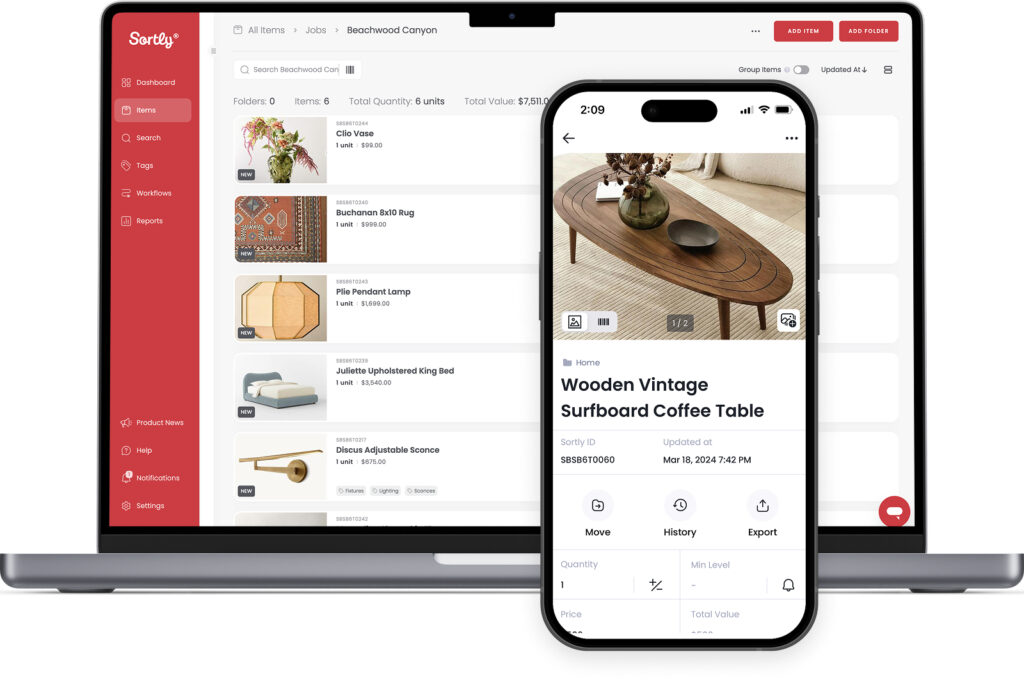
Sortly offers simple check-in/check-out workflows supported by barcode and QR code scanning and label generation. Teams can assign items, track assets across locations, and see who has what in real time. Its visual interface and quick setup make it a strong fit for administrative and operations teams managing tools, laptops, and shared equipment.
Selected features
- Barcode and QR code scanning with label generation: Label tools with custom-generated barcodes and QR codes, and scan them in or out, so you always know who has what and where it was last used.
- Inventory photos — Add visual proof to every item. Easily track asset depreciation and know exactly when it’s time to budget for a replacement.
- Mobile app — Update records from a job site, vehicle, or storage room so your asset database is always up to date
- Custom folders — Organize equipment by job site, department, vehicle, or team so your asset database matches how your team thinks and how your business runs
- Offline access — Check items in and out from basements or remote sites without an internet connection, ensuring data accuracy everywhere
- Maintenance alerts — Set date-based notifications when tools need maintenance or servicing so your assets remain safe for consistent use
Cons / limitations
- Not intended for complex IT asset lifecycle management or enterprise IT asset lifecycle systems
What customers say
“As a manufacturer, we use Sortly to keep track of all the parts that come and go from our warehouse and back once we receive a completed product. Our team has a really easy time scanning barcodes to help us keep track of all our parts. Sortly has become part of our daily operation.” – Michael S. (Capterra)
“I can’t imagine running my inventory on a clunkier or messier system. It’s easy to use and integrates well in my business. QR codes are a game changer and helps keep me away from messy, tedious spreadsheets.” – Tim T. (Capterra)
2. Asset Panda
Overview
Asset Panda offers customizable asset management with check-in/check-out functions. It is flexible and supports detailed workflows, though setup can take longer.
Selected features
- Barcode scanning
- Custom workflows
- Asset assignment
- Reporting tools
- Mobile app
Cons / limitations
- More configuration required
- Interface can feel complex for non-technical teams
3. EZOfficeInventory
Overview
EZOfficeInventory supports equipment tracking, reservations, and check-in/check-out workflows. It is widely used by organizations with large equipment inventories.
Selected features
- Barcode and QR code scanning
- Reservations and scheduling
- Maintenance tracking
- Mobile app
- Location management
Cons / limitations
- More features than some teams need
- Interface can feel busy
4. InvGate Assets
Overview
InvGate Assets is an IT asset management tool with check-in/check-out capabilities. It is best suited for organizations with formal IT processes.
Selected features
- Asset assignment
- Discovery tools
- Audit logs
- Reporting
- Lifecycle tracking
Cons / limitations
- Not designed for field teams or tool-heavy operations
- More complex setup
5. ManageEngine AssetExplorer
Overview
ManageEngine AssetExplorer is an IT asset platform with check-in/check-out functionality. It is built for IT departments managing hardware and software assets.
Selected features
- Asset lifecycle tracking
- Check-in/check-out
- CMDB
- Contract and warranty tracking
- Reporting
Cons / limitations
- Not ideal for operations or equipment-heavy teams
- Requires IT involvement for setup and maintenance
How Sortly supports check-in/check-out workflows
Sortly helps teams track assets visually, automate updates, and reduce the manual work that leads to lost tools and unclear responsibility. With mobile scanning, real-time visibility, and simple check-in/check-out actions, teams can optimize equipment management without changing how they work.
If you’re looking to stay organized, reduce day-to-day and long-term asset management challenges, and unlock unparalleled insights into your equipment and assets’ condition, whereabouts, and history, Sortly can help.
Start your two-week free trial of Sortly today.